An inbox with only what matters.
Paisan reads your Office 365 mail as it arrives, sorts it into categories, and quietly sets the noise aside. Nothing is deleted. Everything is one click away.
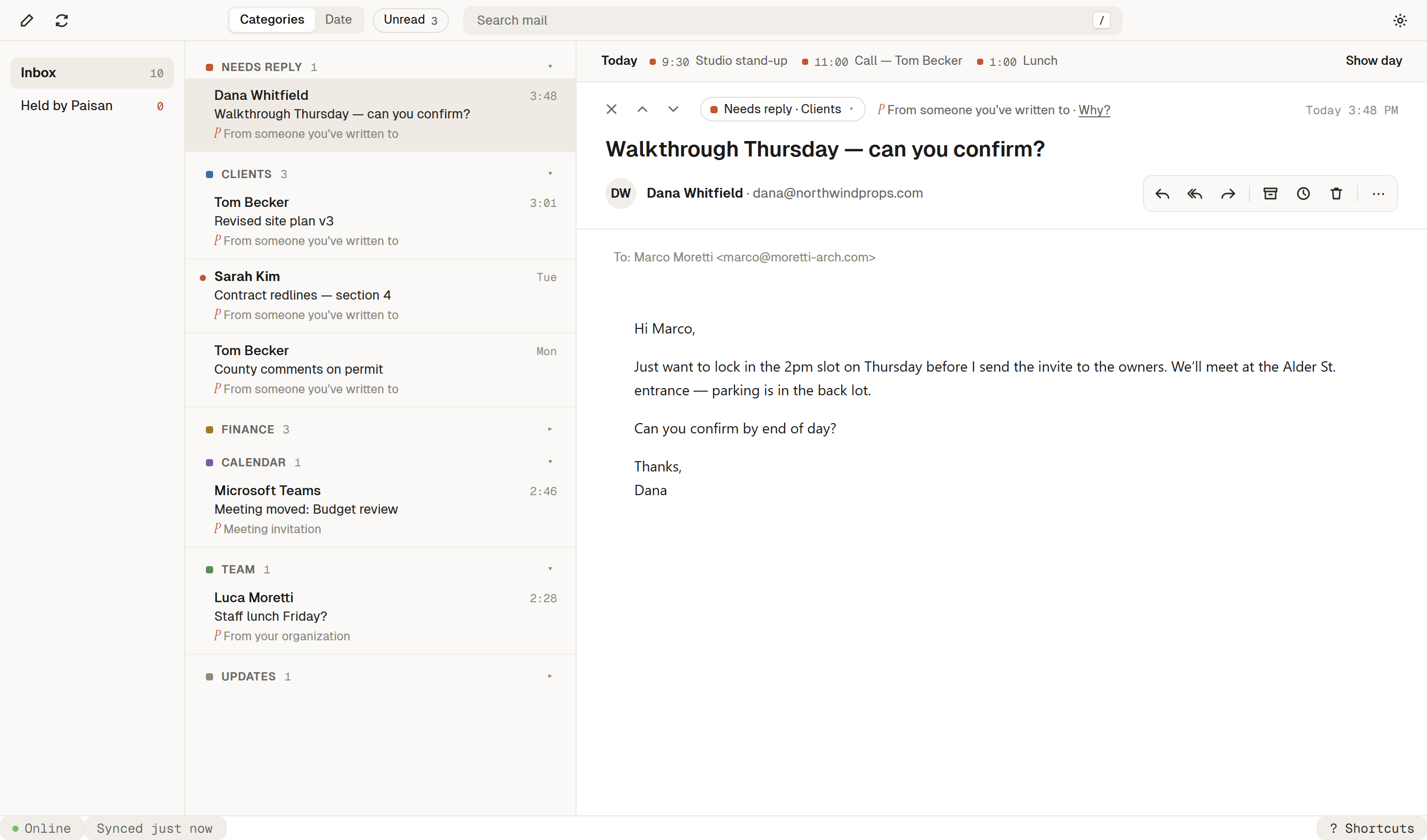
Triage that happens before you open the app.
Sorted on arrival
Paisan files each message into categories like Needs reply, Clients, Finance, and Team, so your inbox opens already organized.
Noise, set aside
Newsletters, notifications, and cold outreach move out of view. They’re never deleted, and you can see them whenever you want.
Your calendar, beside you
Today’s schedule sits next to your mail, so you can answer “can we meet Thursday?” without switching apps.
Search the way you remember things.
"The contract Dana sent before the offsite." Paisan finds it, tells you what it found, and drafts the reply in your voice when you're ready.
Keyboard first
J and K to move, E to archive, R to reply, / to search. Press ? anytime to see the rest.
Built for Microsoft 365
Works with your existing Outlook mailbox and calendar. No migration, no new address.
Private by design
Mail is cached on your device. Hidden messages stay in your mailbox, untouched.